 FREE SHIPPING on all items, within the contiguous 48 states.

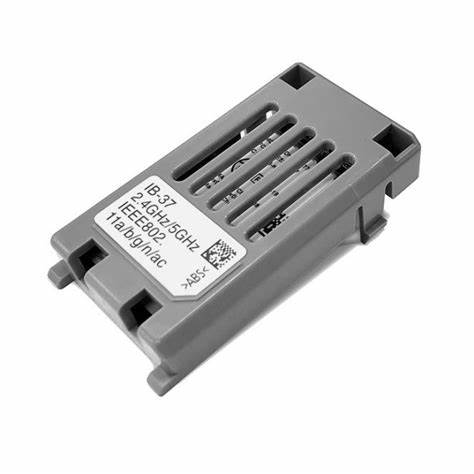


Kyocera IB-37 Wireless Network Interface – Open Box 1503T80UN0YPTS
Box was open for photographing and not installed.
Add convenient wireless connectivity to a compatible Kyocera printer or multifunction system with the Genuine Kyocera IB-37 Wireless Network Interface.
The IB-37 is a dual-band wireless LAN option supporting both 2.4 GHz and 5 GHz Wi-Fi, allowing compatible Kyocera devices to connect to wireless networks without relying solely on a wired Ethernet connection.
It also supports Wi-Fi Direct, allowing compatible computers and mobile devices to print directly to the Kyocera device without requiring a traditional wireless router connection.
Product Information
- Manufacturer: Kyocera
- Model: IB-37
- Alternate Search: IB37
- Kyocera Part Number / SKU: 1503T80UN0
- Product Type: Wireless LAN / Network Interface
- Wireless Bands: 2.4 GHz and 5 GHz
- Wireless Standard: IEEE 802.11b/g/n
- Maximum Wireless Speed: Up to approximately 65 Mbps under supported 802.11n conditions
- Wi-Fi Direct: Supported
- Interface Type: Internal / USB-based wireless interface option
- Condition: Genuine Kyocera OEM
- Quantity: 1 wireless interface per unit ordered
Dual-Band Wireless Connectivity
The IB-37 supports both:
- 2.4 GHz Wi-Fi
- 5 GHz Wi-Fi
Dual-band support gives compatible Kyocera devices more flexibility when connecting to modern wireless networks.
The 5 GHz band can also help reduce congestion in environments where the 2.4 GHz spectrum is heavily used.
Wi-Fi Direct Support
When the IB-37 is installed, compatible Kyocera devices can support Wi-Fi Direct.
Wi-Fi Direct allows a compatible computer, smartphone, or tablet to connect directly to the printer without requiring the printer and mobile device to first connect through the same wireless router.
This can be useful for:
- Mobile printing
- Guest printing
- Temporary device connections
- Offices where access to the primary wireless network is restricted
Wireless Network Printing
Once installed and configured, the IB-37 allows the Kyocera device to operate within a wireless LAN environment.
Depending on the host machine and configuration, wireless printing may be available through supported methods such as:
- Standard network printing
- KYOCERA Mobile Print
- Apple AirPrint
- Mopria
- Wi-Fi Direct
- Other supported network-printing applications
Available features depend on the host machine, operating system, firmware, and network configuration.
Compatible Kyocera Equipment
The IB-37 is supported on a broad range of newer Kyocera ECOSYS and TASKalfa devices.
Examples include:
- Kyocera ECOSYS PA3500cx
- Kyocera ECOSYS PA4000cx
- Kyocera TASKalfa PA4500ci
- Kyocera TASKalfa MZ-series multifunction systems
- Kyocera TASKalfa MZ7500ci
- Kyocera TASKalfa MZ8500ci
- Kyocera TASKalfa MZ9500ci
- Kyocera TASKalfa MZ7500i
- Kyocera TASKalfa MZ8500i
- Kyocera TASKalfa MZ9500i
- Kyocera TASKalfa MZ10500i
The IB-37 is used across many additional compatible Kyocera models.
Because compatibility varies by machine generation and internal interface configuration, always verify the exact printer or MFP model before ordering.
Important IB-37 vs. IB-38 Difference
The IB-37 provides:
- 2.4 GHz wireless support
- 5 GHz wireless support
- Wi-Fi Direct capability
The IB-38 is generally limited to:
- 2.4 GHz wireless support
For customers wanting dual-band wireless connectivity, the IB-37 is typically the preferred option.
Installation Compatibility
On supported models, the IB-37 and IB-38 cannot be installed at the same time.
The printer should be checked for existing wireless accessories before installation.
Some newer Kyocera systems also offer extended-range wireless options such as the IB-54 or IB-55. These are different accessories and may use different internal expansion interfaces.
Wireless Security
Supported wireless-security options depend on the host machine and firmware.
Current Kyocera systems equipped with the IB-37 can support security methods including:
- WPA2-PSK
- WPA2-EAP
- AES encryption
- WPA3 options on supported newer models
Exact security availability depends on the printer model and installed firmware.
Configuration
Depending on the host machine, wireless settings can typically be configured through:
- The printer’s operation panel
- Kyocera Wi-Fi Setup Tool
- Command Center RX
- Wi-Fi Direct settings
Network configuration may require administrator access.
Professional Installation / Setup
Although the IB-37 is designed as an optional Kyocera interface accessory, installation and network setup may require access to the machine’s internal interface area and system settings.
For business or managed-network environments, installation and configuration by a qualified Kyocera technician or network administrator is recommended.
Genuine Kyocera Accessory
Using the genuine Kyocera IB-37 helps ensure proper compatibility with supported Kyocera firmware, wireless settings, network configuration, and system hardware.
Product Information Disclaimer
Product Information Disclaimer: Specifications and product information are approximate and subject to change due to ongoing manufacturer improvements. Information shown is based on the most current manufacturer data available at the time of publication.
Product photos are for illustration purposes only. Manufacturers may change product packaging, labeling, appearance, or included packaging materials from time to time without notice. The product received may therefore differ slightly in appearance from the image shown while remaining the correct manufacturer part number and item ordered.
Please review our Return Policy in the Terms and Conditions before purchasing.